이코에코(Eco²) Knowledge Base/Applied
LLM Gateway & Unified Interface Pattern
mango_fr
2026. 1. 5. 06:16
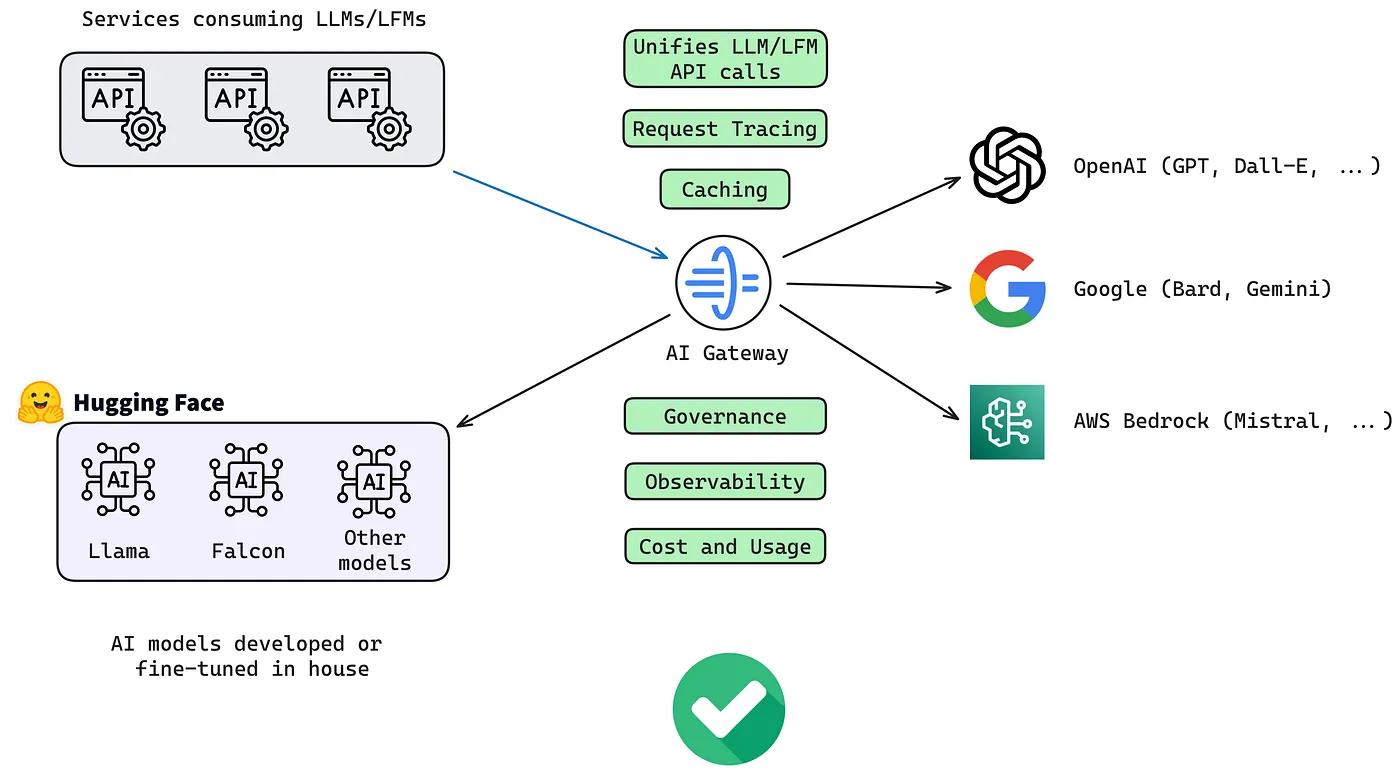
AI 에이전트 시스템에서 LLM 모델 선택을 에이전트 로직과 분리하는 아키텍처 패턴
용어 정의
⚠️ Note: 이 문서에서 다루는 개념들은 업계에서 다양한 명칭으로 불립니다.
공식적으로 통일된 명칭은 없으며, 아래와 같은 용어들이 실제로 사용됩니다.
| 실제 사용 용어 | 사용처 | 설명 |
|---|---|---|
| LLM Gateway / AI Gateway | Cloudflare, Kong, AWS | LLM 요청을 중앙에서 관리하는 게이트웨이 |
| LLM Router | 당근, Martian | 모델별로 요청을 라우팅하는 컴포넌트 |
| Unified LLM Interface | LiteLLM, OpenRouter | 여러 Provider를 하나의 API로 통합 |
| Multi-Provider Support | LangChain, LiteLLM | 다중 LLM Provider 지원 |
| Model Abstraction Layer | 일반 아키텍처 용어 | 모델 구현을 추상화하는 계층 |
관련 오픈소스 프로젝트
- LiteLLM - 100+ LLM을 OpenAI 형식으로 통합
- OpenRouter - 여러 LLM Provider 통합 API 서비스
- Portkey - AI Gateway with fallbacks
- Martian Router - 자동 모델 라우팅
개요
Model-Agnostic Agent Architecture는 AI 에이전트 시스템에서 LLM 모델 선택과 에이전트 실행 로직(Agent Loop)을 분리하는 설계 패턴이다. 이 패턴을 통해 에이전트는 특정 LLM에 종속되지 않고, 런타임 또는 설계 시점에 유연하게 모델을 교체할 수 있다.
핵심 개념
1. 전통적 AI 에이전트 구조의 문제점 (이코에코 LLM 파이프라인)
[사용자 요청] → [에이전트 로직 + GPT-4 직접 호출] → [결과]문제점:
- 특정 모델에 하드코딩된 의존성
- 모델 교체 시 전체 코드 수정 필요
- 비용 최적화 어려움
- 모델 장애 시 전체 서비스 중단
2. Model-Agnostic 구조
[사용자 요청]
      ↓
[Model Selector] → "claude-4-sonnet" or "gpt-5" or "auto"
      ↓
[Agent Loop (ReAct)]
   ├─ Think (LLM 호출)
   ├─ Act (Tool 실행)
   └─ Observe (결과 분석)
      ↓
[결과]
장점:
- 모델 독립적인 에이전트 로직
- 런타임 모델 교체 가능
- 작업 유형별 최적 모델 선택
- Fallback 메커니즘 구현 용이
아키텍처 패턴
패턴 1: Frontend Model Selection (Cursor 방식)
사용자가 프론트엔드 UI에서 직접 모델을 선택하는 패턴.
┌─────────────────────────────────────────────────────────┐
│                   Frontend (IDE/UI)                      │
│  ┌───────────────────────────────────────────────────┐ │
│  │  Model Selector: [Claude ▼] [GPT ▼] [Gemini ▼]   │ │
│  └───────────────────────────────────────────────────┘ │
└────────────────────────┬────────────────────────────────┘
                         │ model: "claude-4-sonnet"
                         ▼
┌─────────────────────────────────────────────────────────┐
│                     Agent Loop                           │
│  ┌─────────┐    ┌─────────┐    ┌─────────┐             │
│  │ Think   │ →  │ Act     │ →  │ Observe │ → [Loop]    │
│  │ (LLM)   │    │ (Tool)  │    │ (Read)  │             │
│  └─────────┘    └─────────┘    └─────────┘             │
└─────────────────────────────────────────────────────────┘
구현 예시 (Cursor Cloud Agents API):
# Agent 실행 시 model 파라미터로 전달
POST /v0/agents
{
    "prompt": {
        "text": "Add README.md with installation instructions"
    },
    "model": "claude-4-sonnet",  # 프론트엔드에서 선택한 모델
    "source": {
        "repository": "https://github.com/org/repo"
    }
}
적용 사례:
- Cursor IDE
- GitHub Copilot Chat (부분적)
- OpenAI ChatGPT (모델 선택 드롭다운)
패턴 2: Gateway Model Routing (당근 방식)
중앙 집중식 Gateway가 모델 라우팅을 담당하는 패턴.
┌──────────────────────────────────────────────────────────┐
│                   Product Services                        │
│   Service A          Service B          Service C         │
└─────────┬───────────────┬───────────────┬────────────────┘
          │               │               │
          ▼               ▼               ▼
┌──────────────────────────────────────────────────────────┐
│                      LLM Router                           │
│  ┌────────────────────────────────────────────────────┐ │
│  │  • 통합 인터페이스 (OpenAI SDK 표준)                │ │
│  │  • model="claude-4.5-sonnet" → 자동 라우팅          │ │
│  │  • Retry, Fallback, Circuit Breaker                 │ │
│  │  • 비용/사용량 중앙 관리                            │ │
│  └────────────────────────────────────────────────────┘ │
└───────────────────────────┬──────────────────────────────┘
                            │
          ┌─────────────────┼─────────────────┐
          ▼                 ▼                 ▼
    ┌──────────┐      ┌──────────┐      ┌──────────┐
    │ OpenAI   │      │ Anthropic│      │ Google   │
    └──────────┘      └──────────┘      └──────────┘
구현 예시:
from openai import OpenAI

# base_url만 변경하면 모든 모델 사용 가능
client = OpenAI(base_url="https://llm-router.internal")

# 모델만 바꾸면 자동으로 해당 Provider로 라우팅
response = client.chat.completions.create(
    model="claude-4.5-sonnet",  # 또는 "gpt-5.2", "gemini-3-pro"
    messages=[{"role": "user", "content": "Hello!"}]
)
적용 사례:
- 당근마켓 LLM Router
- AWS Bedrock
- Azure OpenAI Service
패턴 3: Agent-Level Model Configuration (CrewAI 방식)
각 에이전트에 개별적으로 모델을 할당하는 멀티에이전트 패턴.
┌────────────────────────────────────────────────────────┐
│                    Multi-Agent System                   │
│                                                         │
│  ┌─────────────────┐    ┌─────────────────┐           │
│  │ Researcher Agent│    │ Writer Agent    │           │
│  │ llm: GPT-4      │    │ llm: Claude-3   │           │
│  │ tools: [search] │    │ tools: [write]  │           │
│  └────────┬────────┘    └────────┬────────┘           │
│           │                      │                     │
│           └──────────┬───────────┘                     │
│                      │                                 │
│              ┌───────▼───────┐                         │
│              │  Orchestrator │                         │
│              │  (Task Flow)  │                         │
│              └───────────────┘                         │
└────────────────────────────────────────────────────────┘
구현 예시 (CrewAI):
from crewai import Agent, Task, Crew
from langchain_openai import ChatOpenAI
from langchain_anthropic import ChatAnthropic

# 각 에이전트에 다른 모델 할당
researcher = Agent(
    role="Researcher",
    goal="Research the topic thoroughly",
    llm=ChatOpenAI(model="gpt-4"),
    tools=[search_tool]
)

writer = Agent(
    role="Writer",
    goal="Write compelling content",
    llm=ChatAnthropic(model="claude-3-opus"),
    tools=[write_tool]
)

# Crew로 에이전트들 조합
crew = Crew(agents=[researcher, writer], tasks=[...])
적용 사례:
- CrewAI
- AutoGen (Microsoft)
- OpenAI Swarm
패턴 4: Dynamic Model Selection (LangGraph 방식)
런타임에 작업 특성에 따라 동적으로 모델을 선택하는 패턴.
┌────────────────────────────────────────────────────────┐
│                   Request Handler                       │
│                         │                               │
│                         ▼                               │
│              ┌─────────────────────┐                   │
│              │   Model Router      │                   │
│              │  (Dynamic Selection)│                   │
│              └──────────┬──────────┘                   │
│                         │                               │
│    ┌────────────────────┼────────────────────┐         │
│    │                    │                    │         │
│    ▼                    ▼                    ▼         │
│ [Simple]            [Complex]           [Creative]     │
│ GPT-3.5             Claude-4            GPT-4          │
│ (저비용)            (고성능)            (창의성)       │
└────────────────────────────────────────────────────────┘
구현 예시 (LangGraph):
from langgraph.prebuilt import create_react_agent

def model_router(state):
    """작업 복잡도에 따라 모델 선택"""
    task_complexity = analyze_complexity(state["messages"])

    if task_complexity == "simple":
        return ChatOpenAI(model="gpt-3.5-turbo")
    elif task_complexity == "complex":
        return ChatAnthropic(model="claude-3-opus")
    else:
        return ChatOpenAI(model="gpt-4")

# 미들웨어로 동적 모델 선택
@wrap_model_call
def select_model(config):
    return model_router(config["state"])
적용 사례:
- LangGraph (LangChain v1.0+)
- Cursor Auto Mode
- 당근 Prompt Studio (Model Fallback)
구현 가이드
1. 인터페이스 정의
from abc import ABC, abstractmethod
from typing import List, Dict, Any

class LLMInterface(ABC):
    """Model-Agnostic LLM 인터페이스"""

    @abstractmethod
    async def chat_completion(
        self,
        messages: List[Dict[str, str]],
        model: str,
        **kwargs
    ) -> str:
        pass

    @abstractmethod
    async def function_call(
        self,
        messages: List[Dict[str, str]],
        tools: List[Dict[str, Any]],
        model: str,
        **kwargs
    ) -> Dict[str, Any]:
        pass
2. 모델 라우터 구현
class ModelRouter:
    """다양한 LLM Provider를 통합 관리하는 라우터"""

    def __init__(self):
        self.providers = {
            "openai": OpenAIProvider(),
            "anthropic": AnthropicProvider(),
            "google": GoogleProvider(),
        }
        self.model_mapping = {
            "gpt-4": "openai",
            "gpt-3.5-turbo": "openai",
            "claude-3-opus": "anthropic",
            "claude-3-sonnet": "anthropic",
            "gemini-pro": "google",
        }

    def get_provider(self, model: str) -> LLMInterface:
        provider_name = self.model_mapping.get(model)
        if not provider_name:
            raise ValueError(f"Unknown model: {model}")
        return self.providers[provider_name]

    async def route(
        self,
        messages: List[Dict],
        model: str,
        **kwargs
    ) -> str:
        provider = self.get_provider(model)
        return await provider.chat_completion(messages, model, **kwargs)
3. Agent Loop 구현
class ModelAgnosticAgent:
    """Model-Agnostic ReAct Agent"""

    def __init__(self, model_router: ModelRouter):
        self.router = model_router
        self.tools = {}

    async def run(
        self,
        prompt: str,
        model: str,  # 외부에서 모델 주입
        max_iterations: int = 10
    ) -> str:
        messages = [{"role": "user", "content": prompt}]

        for _ in range(max_iterations):
            # Think: LLM에게 다음 행동 결정 요청
            response = await self.router.route(
                messages=messages,
                model=model,  # 주입된 모델 사용
                tools=list(self.tools.values())
            )

            if response.get("tool_calls"):
                # Act: 도구 실행
                tool_results = await self._execute_tools(response["tool_calls"])

                # Observe: 결과를 컨텍스트에 추가
                messages.append({"role": "tool", "content": tool_results})
            else:
                # 완료
                return response["content"]

        return "Max iterations reached"
비교 분석
| 패턴 | 모델 선택 시점 | 적합한 사용 사례 | 복잡도 |
|---|---|---|---|
| Frontend Selection | 런타임 (사용자) | 개발자 도구, IDE | 낮음 |
| Gateway Routing | 요청 시점 | 엔터프라이즈, B2B | 중간 |
| Agent-Level Config | 설계 시점 | 멀티에이전트 시스템 | 중간 |
| Dynamic Selection | 런타임 (자동) | 비용 최적화, Auto Mode | 높음 |
모범 사례
1. 통합 인터페이스 사용
OpenAI SDK를 표준으로 채택하여 모든 모델을 동일한 방식으로 호출.
2. Fallback 메커니즘 구현
async def call_with_fallback(messages, primary_model, fallback_models):
    for model in [primary_model] + fallback_models:
        try:
            return await router.route(messages, model)
        except RateLimitError:
            continue
    raise AllModelsFailedError()
3. 비용/성능 모니터링
모델별 사용량, 비용, 응답 시간을 추적하여 최적화.
4. Circuit Breaker 패턴
특정 모델의 연속 실패 시 자동으로 차단하고 대체 모델로 전환.