이코에코(Eco²) Observability #1: EFK 파이프라인 구축
개요
이번 글에서는 ECK(Elastic Cloud on Kubernetes) Operator를 사용하여 EFK 스택을 구축하는 전체 과정을 다룹니다.
구축 순서
- 인프라 프로비저닝 (Terraform/Ansible)
- ECK Operator 설치
- Elasticsearch CR 배포
- Kibana CR 배포
- Fluent Bit DaemonSet 배포
- External Secrets 연동
Observability 아키텍처 구조
전체 구조도

컴포넌트 구성 및 역할
| 컴포넌트 | 배포 방식 | 역할 | 리소스 |
|---|---|---|---|
| Fluent Bit | DaemonSet (16 노드) | 로그 수집, 파싱, ECS 변환, 전송 | ~64MB/노드 |
| Elasticsearch | StatefulSet (ECK CR) | 로그 저장, 인덱싱, 검색 | 4GB heap, 50GB disk |
| Kibana | Deployment (ECK CR) | 시각화, 대시보드, 검색 UI | 1GB |
| ECK Operator | Deployment | ES/Kibana CRD 관리 | 200MB |
현재 클러스터 상태
| 항목 | 상태 |
|---|---|
| Fluent Bit DaemonSet | 16/16 Ready |
| Elasticsearch | green (1 node) |
| 일일 로그량 | ~500K+ docs/day |
| 인덱스 크기 | ~420MB/day |
Fluent Bit: 에이전트 기반 수집 전략
왜 Fluent Bit을 에이전트(DaemonSet)로 선택했는가?
1. Kubernetes 네이티브 설계
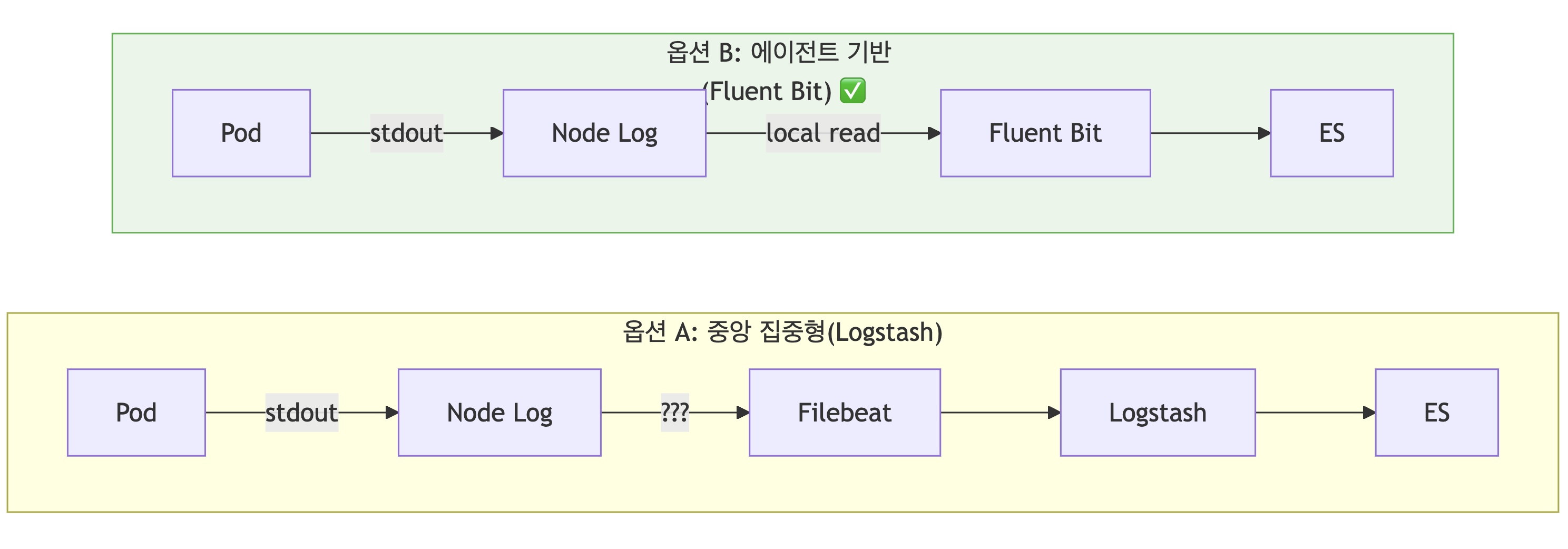
| 비교 항목 | 중앙 집중형 (Logstash) | 에이전트 기반 (Fluent Bit) |
|---|---|---|
| 네트워크 | 원격 수집 필요 | 로컬 파일 읽기 |
| 확장성 | 노드 추가 시 설정 변경 | DaemonSet 자동 배포 |
| 장애 격리 | SPOF 위험 | 노드별 독립 |
2. 경량 리소스 사용

| 솔루션 | 노드당 메모리 | 총 사용량 (16노드) |
|---|---|---|
| Fluent Bit | ~64MB | ~1GB |
| Fluentd | ~40MB | ~640MB |
| Logstash HA | 2GB × 2 | ~4GB |
3. ECS 표준 필드 자동 매핑
현재 구현된 Lua 스크립트로 K8s 메타데이터를 ECS 필드로 자동 변환:
-- service.name 매핑 우선순위
-- 1. 앱 로그의 기존 service.name 유지
-- 2. k8s_labels_app
-- 3. k8s_labels_app.kubernetes.io/name
-- 4. k8s_labels_k8s-app
-- 5. k8s_container_name
향후 Kafka 전환을 위한 설계
EDA 전환 로드맵에 따라, EDA 도입 시 Fluent Bit → Kafka → Logstash → ES 구조로 전환합니다.
Fluent Bit output 변경만으로 전환
# Phase 1: Elasticsearch 직접 전송 (현재)
[OUTPUT]
    Name            es
    Match           kube.*
    Host            eco2-logs-es-http.logging.svc.cluster.local
    Port            9200

# Phase 2: Kafka로 전송 (output만 변경)
[OUTPUT]
    Name            kafka
    Match           kube.*
    Brokers         kafka.kafka.svc.cluster.local:9092
    Topics          logs-raw
    Format          json
🔧 Step 1: 인프라 프로비저닝
Terraform - 로깅 전용 노드 추가
# terraform/instances.tf
resource "aws_instance" "logging" {
  count         = 1
  ami           = data.aws_ami.ubuntu.id
  instance_type = "t3.large"  # 8GB RAM

  root_block_device {
    volume_size = 100
    volume_type = "gp3"
  }

  tags = {
    Name     = "k8s-logging"
    Role     = "logging"
    Workload = "logging"
  }
}
Ansible - 노드 설정
# ansible/playbooks/03-worker-join.yml
- name: Configure logging node
  hosts: logging
  tasks:
    - name: Apply node labels
      command: >
        kubectl label node k8s-logging
        workload=logging --overwrite

    - name: Apply node taints
      command: >
        kubectl taint node k8s-logging
        domain=observability:NoSchedule --overwrite
🔧 Step 2: ECK Operator 설치
ArgoCD Application
# clusters/dev/apps/62-eck-operator.yaml
apiVersion: argoproj.io/v1alpha1
kind: Application
metadata:
  name: eck-operator
  namespace: argocd
  annotations:
    argocd.argoproj.io/sync-wave: "62"
spec:
  project: default
  source:
    chart: eck-operator
    repoURL: https://helm.elastic.co
    targetRevision: 2.11.0
    helm:
      values: |
        installCRDs: true
        resources:
          requests:
            memory: 150Mi
            cpu: 100m
          limits:
            memory: 200Mi
            cpu: 200m
  destination:
    server: https://kubernetes.default.svc
    namespace: elastic-system
🔧 Step 3: Elasticsearch CR 배포
Elasticsearch Custom Resource
# workloads/logging/base/elasticsearch.yaml
apiVersion: elasticsearch.k8s.elastic.co/v1
kind: Elasticsearch
metadata:
  name: eco2-logs
  namespace: logging
spec:
  version: 8.11.0
  nodeSets:
  - name: default
    count: 1
    config:
      node.store.allow_mmap: false
      indices.memory.index_buffer_size: 20%
      discovery.seed_hosts: []
      cluster.initial_master_nodes:
      - eco2-logs-es-default-0

    podTemplate:
      spec:
        nodeSelector:
          workload: logging
        tolerations:
        - key: domain
          operator: Equal
          value: observability
          effect: NoSchedule

        containers:
        - name: elasticsearch
          env:
          - name: ES_JAVA_OPTS
            value: "-Xms4g -Xmx4g"
          resources:
            requests:
              memory: 5Gi
              cpu: 500m
            limits:
              memory: 5Gi
              cpu: 2000m

        initContainers:
        - name: sysctl
          securityContext:
            privileged: true
            runAsUser: 0
          command: ['sh', '-c', 'sysctl -w vm.max_map_count=262144']

    volumeClaimTemplates:
    - metadata:
        name: elasticsearch-data
      spec:
        accessModes: [ReadWriteOnce]
        storageClassName: gp3
        resources:
          requests:
            storage: 50Gi

  http:
    tls:
      selfSignedCertificate:
        disabled: true
ECK가 자동 생성하는 리소스
| 리소스 종류 | 이름 | 용도 |
|---|---|---|
| StatefulSet | eco2-logs-es-default |
ES Pod 관리 |
| Service | eco2-logs-es-http |
HTTP 엔드포인트 (9200) |
| Service | eco2-logs-es-transport |
Transport (9300) |
| Secret | eco2-logs-es-elastic-user |
elastic 사용자 비밀번호 |
🔧 Step 4: Kibana CR 배포
Kibana Custom Resource
# workloads/logging/base/kibana.yaml
apiVersion: kibana.k8s.elastic.co/v1
kind: Kibana
metadata:
  name: eco2-kibana
  namespace: logging
spec:
  version: 8.11.0
  count: 1

  elasticsearchRef:
    name: eco2-logs

  config:
    server.name: kibana
    server.host: "0.0.0.0"
    server.publicBaseUrl: https://kibana.dev.growbin.app
    i18n.locale: ko-KR
    monitoring.ui.container.elasticsearch.enabled: true

  podTemplate:
    spec:
      nodeSelector:
        workload: logging
      tolerations:
      - key: domain
        operator: Equal
        value: observability
        effect: NoSchedule
      containers:
      - name: kibana
        env:
        - name: NODE_OPTIONS
          value: "--max-old-space-size=1024"
        resources:
          requests:
            memory: 1Gi
            cpu: 200m
          limits:
            memory: 1Gi
            cpu: 1000m

  http:
    tls:
      selfSignedCertificate:
        disabled: true
🔧 Step 5: Fluent Bit DaemonSet 배포
Fluent Bit 파이프라인
flowchart LR
    subgraph input["INPUT"]
        tail["tail<br/>/var/log/containers/*.log"]
    end

    subgraph filter["FILTER Chain"]
        cri["CRI Parser<br/>containerd 로그 파싱"]
        k8s["kubernetes<br/>메타데이터 추가"]
        grep["grep<br/>health probe 제외"]
        modify["modify<br/>cluster/env 추가"]
        nest["nest<br/>k8s_ prefix"]
        lua["Lua ECS<br/>ECS 필드 매핑"]
    end

    subgraph output["OUTPUT"]
        es["Elasticsearch<br/>Replace_Dots: Off"]
    end

    tail --> cri --> k8s --> grep --> modify --> nest --> lua --> es
주요 설정
# workloads/logging/base/fluent-bit.yaml (핵심 부분)
[INPUT]
    Name              tail
    Tag               kube.*
    Path              /var/log/containers/*.log
    Parser            cri  # containerd 런타임용
    Mem_Buf_Limit     50MB

[FILTER]
    Name                kubernetes
    Match               kube.*
    Merge_Log           On      # JSON 병합
    Keep_Log            Off     # 원본 log 필드 제거
    Labels              On

# ECS 필드 자동 매핑 (Lua 스크립트)
[FILTER]
    Name          lua
    Match         kube.*
    script        /fluent-bit/etc/ecs-enrichment.lua
    call          enrich_with_ecs_fields

[OUTPUT]
    Name            es
    Match           kube.*
    Host            eco2-logs-es-http.logging.svc.cluster.local
    Logstash_Format On
    Logstash_Prefix logs
    Replace_Dots    Off  # ECS dot notation 유지
    Buffer_Size     5MB
ECS Enrichment Lua 스크립트
function enrich_with_ecs_fields(tag, timestamp, record)
    -- service.name 매핑 (앱 로그 우선)
    if not record["service.name"] then
        local service_name = record["k8s_labels_app"]
                          or record["k8s_labels_app.kubernetes.io/name"]
                          or record["k8s_container_name"]
        if service_name then
            record["service.name"] = service_name
        end
    end

    -- kubernetes.* ECS 필드 매핑
    record["kubernetes.namespace"] = record["k8s_namespace_name"]
    record["kubernetes.pod.name"] = record["k8s_pod_name"]
    record["kubernetes.container.name"] = record["k8s_container_name"]

    return 1, timestamp, record
end
🔧 Step 6: External Secrets 연동
ExternalSecret 리소스
# workloads/secrets/external-secrets/dev/logging-secrets.yaml
apiVersion: external-secrets.io/v1beta1
kind: ExternalSecret
metadata:
  name: elasticsearch-credentials
  namespace: logging
spec:
  refreshInterval: 1h
  secretStoreRef:
    kind: ClusterSecretStore
    name: aws-ssm-store
  data:
  - secretKey: ES_PASSWORD
    remoteRef:
      key: /sesacthon/dev/observability/elasticsearch-password
  target:
    name: elasticsearch-credentials
    template:
      data:
        ES_USER: elastic
        ES_PASSWORD: "{{ .ES_PASSWORD }}"
🔒 NetworkPolicy 설정
apiVersion: networking.k8s.io/v1
kind: NetworkPolicy
metadata:
  name: allow-fluent-bit-to-es
  namespace: logging
spec:
  podSelector:
    matchLabels:
      common.k8s.elastic.co/type: elasticsearch
  ingress:
  - from:
    - namespaceSelector: {}
      podSelector:
        matchLabels:
          app: fluent-bit
    ports:
    - port: 9200
✅ 배포 검증
1. ES 클러스터 상태 확인
# Pod 상태
kubectl get pods -n logging

# ES 클러스터 헬스
kubectl exec -it eco2-logs-es-default-0 -n logging -- \
  curl -u elastic:$ES_PASSWORD localhost:9200/_cluster/health?pretty
2. 로그 인덱스 확인
kubectl exec -it eco2-logs-es-default-0 -n logging -- \
  curl -u elastic:$ES_PASSWORD localhost:9200/_cat/indices?v

# 현재 상태 (2025-12-18 기준):
# logs-2025.12.17  1.1M docs  421MB
# logs-2025.12.18  500K+ docs  237MB
3. Kibana 접속
URL: https://kibana.dev.growbin.app
ID: elastic
PW: <ECK가 생성한 비밀번호>
트러블슈팅
Issue 1: Fluent Bit 401 Unauthorized
[error] [output:es:es.0] HTTP status=401 URI=/_bulk원인: ES 인증 정보 누락
해결: External Secrets로 ES_USER, ES_PASSWORD 환경변수 주입
Issue 2: CRI Parser 오류 (containerd)
[error] invalid JSON in log field원인: docker parser 사용 (containerd 런타임에서)
해결: Parser cri 사용
[PARSER]
    Name        cri
    Format      regex
    Regex       ^(?<time>[^ ]+) (?<stream>stdout|stderr) (?<logtag>[^ ]*) (?<log>.*)$
Issue 3: ECS dot notation 필드 인덱싱 오류
mapper_parsing_exception: Could not dynamically add mapping for field [service.name]원인: ES가 dot을 nested object로 해석
해결:
- Fluent Bit:
Replace_Dots Off - ES Index Template:
subobjects: false
Referenc
- 이코에코(Eco²) EDA 전환 로드맵
- ECK Quickstart
- Fluent Bit Kubernetes Filter
- Elastic Common Schema (ECS)
- External Secrets Operator
- [Redirecting
external-secrets.io](https://external-secrets.io/)
Service
Elastic
Please upgrade your browser This Elastic installation has strict security requirements enabled that your current browser does not meet.
kibana.dev.growbin.app
Grafana
If you're seeing this Grafana has failed to load its application files 1. This could be caused by your reverse proxy settings. 2. If you host grafana under subpath make sure your grafana.ini root_url setting includes subpath. If not using a reverse proxy m
snapshots.raintank.io
Jaeger UI
jaeger.dev.growbin.app