-
이코에코(Eco²) Agent: LangSmith Telemetry 토큰 추적 보강이코에코(Eco²)/Agent 2026. 1. 27. 08:00
Date: 2026-01-27 (Updated)
Author: Claude Code, mangowhoiscloud
Status: Completed
Related: https://rooftopsnow.tistory.com/203Executive Summary
https://docs.langchain.com/langsmith/studio
LangSmith Studio - Docs by LangChain
docs.langchain.com
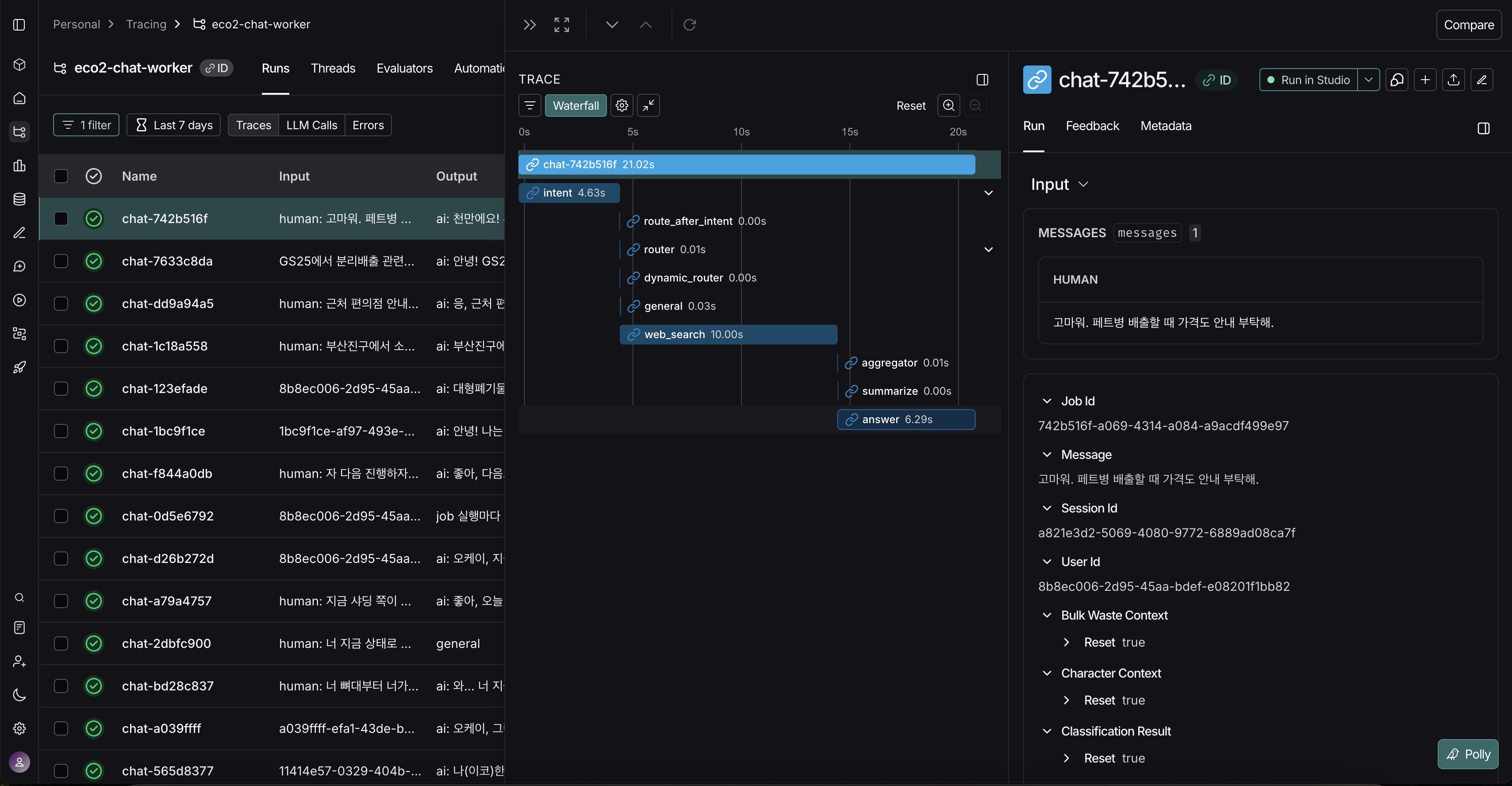
chat-worker의 모든 LLM 호출 경로에 대한 LangSmith 기반 Observability 시스템을 보강, 점검한 과정입니다.
OpenAI와 Gemini 모두 토큰 사용량, 비용, 레이턴시를 자동 추적하며 LangSmith 대시보드에서 실시간 모니터링이 가능합니다.
기존 OTEL + LangSmith 포스팅에서 구축한 Observability 기반 시스템을 실제 이코에코 서비스와 연동하였습니다.
들어가며
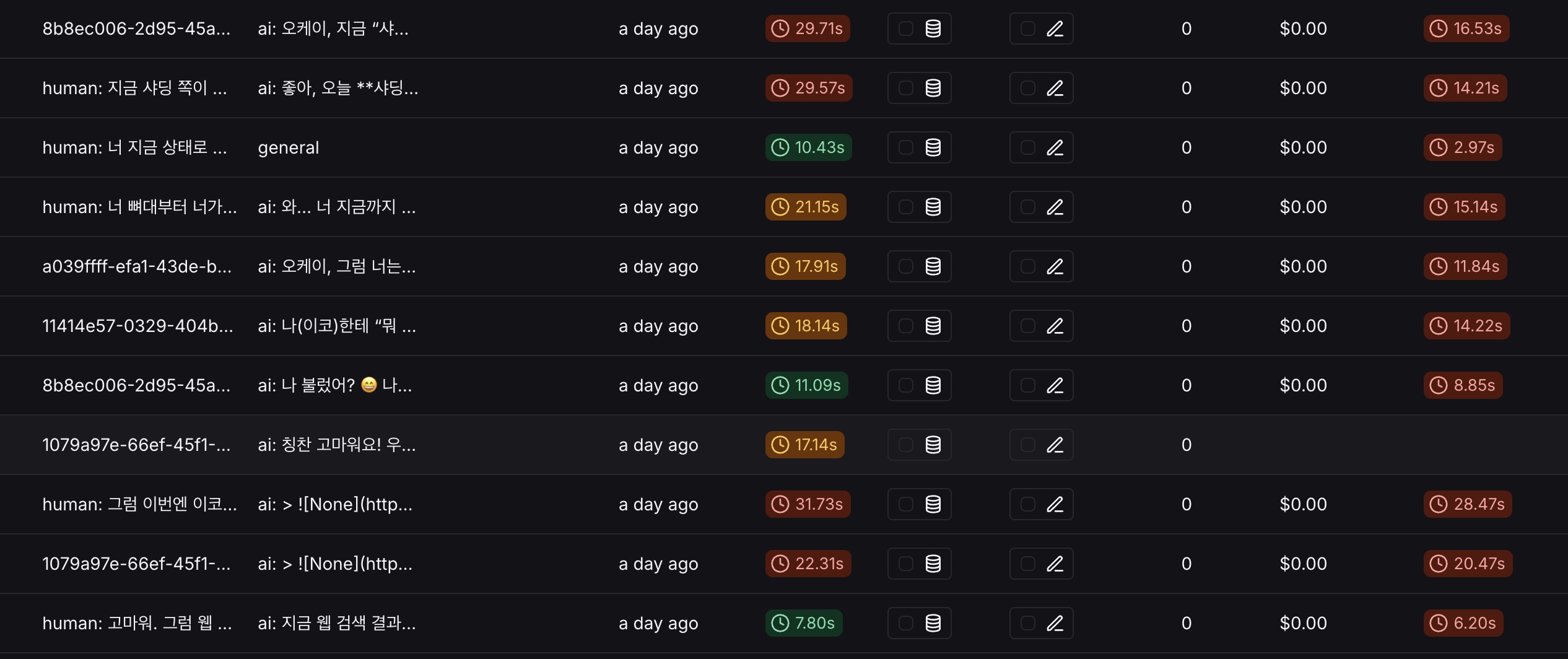
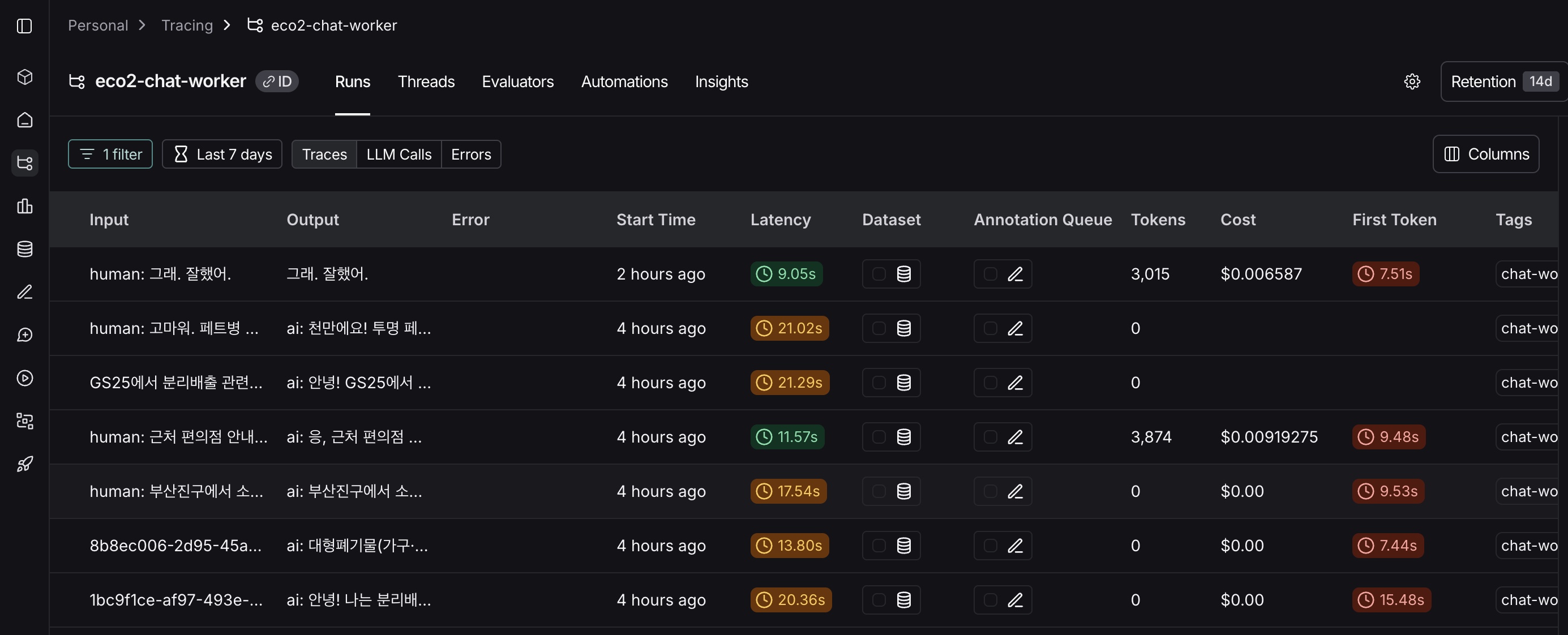
토큰 추적 보강 전 / 보강 후 이전 글에서 LangSmith와 Prometheus를 통합하여 멀티에이전트 파이프라인의 Observability를 구축했습니다.
그런데 LangSmith 대시보드를 열어보니 이상한 점이 있었습니다.
Run Count: 39
Total Tokens: 0 / $0.00
39번의 LLM 호출이 있었는데 토큰 사용량이 추적되지 않았습니다.
이 글에서는 이 문제의 원인을 파헤치고, OpenAI와 Gemini 모든 호출 경로에서 토큰을 정확히 추적하는 방법을 다룹니다.
1. 왜 LangSmith인가?
1.1 기존 APM의 한계
Datadog, New Relic 같은 전통적인 APM 도구로 LLM 애플리케이션을 모니터링하면 어떤 일이 벌어질까요?
측정 가능 측정 불가 HTTP 응답 시간 (2.3초) 왜 2.3초가 걸렸는지 Error Rate (5%) 어떤 프롬프트가 실패했는지 RPS (10 req/s) 요청당 비용이 얼마인지 CPU/Memory 토큰 사용량 분포 전통적인 APM은 LLM을 블랙박스로 취급합니다.
"답변 생성에 2.3초 걸림"이라는 정보만 있을 뿐, 그 안에서 어떤 일이 벌어졌는지 알 수 없습니다.
1.2 LLM Observability가 필요한 이유
Eco² Chat Worker는 17개의 LangGraph 노드가 동적으로 병렬 실행되는 파이프라인입니다.
사용자: "강남역 근처 페트병 분리수거함 어디있어?"

→ intent 노드: "location" 의도 분류 (0.2초, 47토큰)
→ router 노드: location + web_search 병렬 실행 결정
→ [병렬]
    ├── location 노드: 카카오맵 API 호출 (0.6초, 256토큰)
    └── web_search 노드: Google 검색 (1.2초, 601토큰)
→ aggregator 노드: 결과 병합
→ answer 노드: 최종 답변 생성 (0.4초, 357토큰)

총 소요시간: 2.3초 (병렬 실행으로 1.4초 + 순차 0.9초)
총 토큰: 1,261개 ($0.018)
이런 복잡한 흐름에서 어떤 노드가 병목인지, 어떤 노드가 토큰을 많이 쓰는지 관측이 가능해야 합니다.
1.3 LangSmith vs 대안 비교
LLM Observability 도구는 여러 가지가 있습니다. Eco² 프로젝트에서 LangSmith를 선택한 이유를 정리합니다.
기준 LangSmith Langfuse Helicone Datadog LLM LangGraph 통합 ✅ 네이티브 ⚠️ 수동 래핑 필요 ❌ 미지원 ⚠️ 제한적 자동 토큰 추적 ✅ ✅ ✅ ✅ 프롬프트 버전 관리 ✅ Hub ✅ ❌ ❌ OpenAI + Gemini ✅ ✅ ⚠️ OpenAI 중심 ✅ Self-hosted ❌ SaaS only ✅ ❌ ✅ 그래프 시각화 ✅ Studio ❌ ❌ ❌ 가격 Free tier 충분 Free tier $30+/월 $$$$ 결정적 이유: LangGraph 네이티브 통합
Eco²는 LangGraph 기반 파이프라인입니다.
LangSmith는 LangGraph의 모든 노드를 자동으로 추적합니다.
LANGCHAIN_TRACING_V2=true
LANGCHAIN_API_KEY=lsv2_pt_xxxx
다른 도구들은 각 노드에 수동으로 래핑 코드를 추가해야 합니다. 17개 노드에 일일이 추가하는 건 비효율적입니다.
2. 원인 분석
LangSmith가 토큰을 집계하려면 특정 형식으로 데이터를 전달해야 합니다. 문제는 Eco² Chat Worker가 LLM을 호출하는 경로가 7가지 이상이라는 점입니다.
┌─────────────────────────────────────────────────────────────────────────────┐
│                         Eco² LLM 호출 경로 분석                               │
├─────────────────────────────────────────────────────────────────────────────┤
│                                                                              │
│  OpenAI 경로 (4개)                                                           │
│  ────────────────                                                            │
│  1. LangChainOpenAIRunnable._agenerate()    → 비스트리밍                     │
│  2. LangChainOpenAIRunnable._astream()      → 스트리밍                       │
│  3. LangChainLLMAdapter.generate_function_call() → Function Calling         │
│  4. LangChainLLMAdapter.generate_with_tools()    → Agents SDK (web_search)  │
│                                                                              │
│  Gemini 경로 (7개)                                                           │
│  ────────────────                                                            │
│  5. GeminiLLMClient.generate()              → 비스트리밍                     │
│  6. GeminiLLMClient.generate_stream()       → 스트리밍                       │
│  7. GeminiLLMClient.generate_function_call() → Function Calling             │
│  8. GeminiLLMClient.generate_structured()   → Structured Output             │
│  9. GeminiLLMClient.generate_with_tools()   → Google Search Grounding       │
│  10. GeminiVisionClient.analyze()           → 이미지 분석                    │
│  11. GeminiNativeImageGenerator.generate()  → 이미지 생성                    │
│                                                                              │
│  ⚠️ 각 경로마다 토큰 추적 방식이 다름!                                       │
│                                                                              │
└─────────────────────────────────────────────────────────────────────────────┘
각 경로에서 토큰을 수집하는 방식이 다르고, 일부는 아예 토큰을 LangSmith에 전달하지 않고 있었습니다.
3. LangSmith 토큰 추적 원리
3.1 LangSmith가 토큰을 수집하는 방법
LangSmith는 두 가지 방식으로 토큰을 수집합니다.
방법 1:
usage_metadata필드 (권장)LangChain의
AIMessage에usage_metadata필드가 있으면 LangSmith가 자동으로 집계합니다.from langchain_core.messages import AIMessage message = AIMessage( content="안녕하세요! 분리수거 도우미입니다.", usage_metadata={ "input_tokens": 128, "output_tokens": 256, "total_tokens": 384, } )이 방식의 장점은 LangSmith가 자동으로 토큰을 집계한다는 것입니다. 대시보드의 "Total Tokens" 숫자가 이 값들의 합계입니다.
방법 2:
track_token_usage()수동 호출LangChain을 사용하지 않는 경로(예: OpenAI SDK 직접 호출)에서는 수동으로 토큰을 기록해야 합니다.
from langsmith.run_helpers import get_current_run_tree

run_tree = get_current_run_tree()
if run_tree:
    run_tree.extra = run_tree.extra or {}
    run_tree.extra["metrics"] = {
        "input_tokens": 128,
        "output_tokens": 256,
        "total_tokens": 384,
    }
3.2 데이터 흐름
Eco² Chat Worker에서 LangSmith로 토큰 데이터가 전달되는 전체 흐름입니다.
┌─────────────────────────────────────────────────────────────────────────────┐
│                    Eco² → LangSmith 토큰 데이터 흐름                          │
├─────────────────────────────────────────────────────────────────────────────┤
│                                                                              │
│  1️⃣ LLM API 호출                                                             │
│  ┌─────────────────────────────────────────────────────────────────────────┐│
│  │                                                                          ││
│  │  OpenAI API                           Gemini API                         ││
│  │  response.usage = {                   response.usage_metadata = {        ││
│  │    "prompt_tokens": 128,                "prompt_token_count": 128,       ││
│  │    "completion_tokens": 256,            "candidates_token_count": 256,   ││
│  │  }                                    }                                  ││
│  │                                                                          ││
│  │  ⚠️ Provider마다 필드명이 다름!                                          ││
│  └─────────────────────────────────────────────────────────────────────────┘│
│                                     │                                        │
│                                     ▼                                        │
│  2️⃣ LangChain 표준 형식으로 변환                                              │
│  ┌─────────────────────────────────────────────────────────────────────────┐│
│  │                                                                          ││
│  │  AIMessage(                                                              ││
│  │      content="...",                                                      ││
│  │      usage_metadata={           ◀── LangSmith 표준 필드                  ││
│  │          "input_tokens": 128,        (provider와 무관하게 동일)          ││
│  │          "output_tokens": 256,                                           ││
│  │          "total_tokens": 384,                                            ││
│  │      }                                                                   ││
│  │  )                                                                       ││
│  │                                                                          ││
│  └─────────────────────────────────────────────────────────────────────────┘│
│                                     │                                        │
│                                     ▼                                        │
│  3️⃣ LangSmith SDK가 백그라운드로 전송                                         │
│  ┌─────────────────────────────────────────────────────────────────────────┐│
│  │                                                                          ││
│  │  RunTree (메모리)                                                        ││
│  │  ├── trace_id: "job_abc123"                                             ││
│  │  ├── runs: [                                                            ││
│  │  │   {name: "intent", usage: {input: 47, output: 12}},                  ││
│  │  │   {name: "web_search", usage: {input: 89, output: 512}},             ││
│  │  │   {name: "answer", usage: {input: 412, output: 189}},                ││
│  │  │ ]                                                                    ││
│  │  └── total_tokens: 1,261                                                ││
│  │                                                                          ││
│  │         │                                                                ││
│  │         │  Background Thread (5초 배치)                                  ││
│  │         ▼                                                                ││
│  │  POST https://api.smith.langchain.com/runs                              ││
│  │                                                                          ││
│  └─────────────────────────────────────────────────────────────────────────┘│
│                                     │                                        │
│                                     ▼                                        │
│  4️⃣ LangSmith 대시보드                                                        │
│  ┌─────────────────────────────────────────────────────────────────────────┐│
│  │                                                                          ││
│  │  Project: eco2-chat-worker                                              ││
│  │  ────────────────────────────                                           ││
│  │  Total Tokens: 1,261 / $0.018                                           ││
│  │                                                                          ││
│  │  Trace: job_abc123                                                      ││
│  │  ├── intent (47 + 12 = 59 tokens)                                       ││
│  │  ├── web_search (89 + 512 = 601 tokens)                                 ││
│  │  └── answer (412 + 189 = 601 tokens)                                    ││
│  │                                                                          ││
│  └─────────────────────────────────────────────────────────────────────────┘│
│                                                                              │
└─────────────────────────────────────────────────────────────────────────────┘
핵심 포인트: LLM Provider(OpenAI, Gemini)마다 토큰 필드명이 다르지만, LangChain의
usage_metadata로 표준화해야 LangSmith가 집계할 수 있습니다.
4. 경로별 토큰 추적 구현
각 LLM 호출 경로에서 토큰을 추적하는 방법을 상세히 설명합니다.
4.1 OpenAI 비스트리밍 (
_agenerate)source:
apps/chat_worker/infrastructure/llm/clients/langchain_runnable_wrapper.py비스트리밍 호출에서는 응답 객체에
usage필드가 포함되어 있습니다.async def _agenerate(self, messages, ...): response = await self._client.chat.completions.create( model=self._model, messages=formatted_messages, stream=False, ) content = response.choices[0].message.content or "" # ✅ usage_metadata 추가 (LangSmith 표준 형식) usage_metadata = None if response.usage: usage_metadata = { "input_tokens": response.usage.prompt_tokens, "output_tokens": response.usage.completion_tokens, "total_tokens": response.usage.total_tokens, } message = AIMessage( content=content, usage_metadata=usage_metadata, # ◀── 이 필드가 핵심! response_metadata={ "model": self._model, "finish_reason": response.choices[0].finish_reason, }, ) return ChatResult(generations=[ChatGeneration(message=message)])왜
usage_metadata인가?LangSmith SDK는
AIMessage.usage_metadata필드를 읽어서 토큰을 집계합니다.response_metadata에 넣으면 무시됩니다. 이 차이를 몰라서 처음에 토큰이 0으로 표시됐습니다.4.2 OpenAI 스트리밍 (
_astream)source:
apps/chat_worker/infrastructure/llm/clients/langchain_runnable_wrapper.py스트리밍에서는 기본적으로 토큰 사용량이 포함되지 않습니다.
stream_options파라미터를 명시적으로 설정해야 합니다.async def _astream(self, messages, ...): create_params = { "model": self._model, "messages": formatted_messages, "stream": True, "stream_options": {"include_usage": True}, # ◀── 핵심! } stream = await self._client.chat.completions.create(**create_params) last_usage = None async for chunk in stream: # 콘텐츠 청크 yield if chunk.choices and chunk.choices[0].delta.content: yield AIMessageChunk(content=chunk.choices[0].delta.content) # 마지막 청크에 usage 정보 포함 if chunk.usage: last_usage = chunk.usage # ✅ 스트리밍 완료 후 usage_metadata 전달 if last_usage: yield AIMessageChunk( content="", usage_metadata={ "input_tokens": last_usage.prompt_tokens, "output_tokens": last_usage.completion_tokens, "total_tokens": last_usage.total_tokens, }, )stream_options: {"include_usage": True}가 없으면?OpenAI API는 스트리밍 시 기본적으로
usage필드를 반환하지 않습니다. 이 옵션을 설정해야 마지막 청크에 토큰 정보가 포함됩니다.4.3 OpenAI Function Calling
source:
apps/chat_worker/infrastructure/llm/clients/langchain_adapter.pyFunction Calling은 LangChain Runnable을 우회하고 OpenAI SDK를 직접 호출합니다. 따라서 수동으로 토큰을 기록해야 합니다.
async def generate_function_call(
    self,
    prompt: str,
    functions: list[dict],
    ...
) -> tuple[str, dict | None]:
    response = await self._openai_client.chat.completions.create(
        model=self._model,
        messages=[{"role": "user", "content": prompt}],
        tools=[{"type": "function", "function": f} for f in functions],
        tool_choice="auto",
    )

    # ✅ LangSmith에 토큰 수동 기록
    if is_langsmith_enabled() and response.usage:
        try:
            from langsmith.run_helpers import get_current_run_tree

            run_tree = get_current_run_tree()
            if run_tree:
                track_token_usage(
                    run_tree=run_tree,
                    model=self._model,
                    input_tokens=response.usage.prompt_tokens,
                    output_tokens=response.usage.completion_tokens,
                )
        except ImportError:
            pass

    # Function call 결과 추출
    if response.choices[0].message.tool_calls:
        tool_call = response.choices[0].message.tool_calls[0]
        return tool_call.function.name, json.loads(tool_call.function.arguments)

    return "", None
4.4 OpenAI Agents SDK (web_search 노드)
source:
apps/chat_worker/infrastructure/llm/clients/langchain_adapter.pyweb_search노드는 OpenAI Agents SDK를 사용합니다.이 SDK는 내부적으로 여러 번의 LLM 호출을 수행할 수 있어서,
ResponseCompletedEvent에서 토큰을 누적해야 합니다.async def _generate_with_agents_sdk( self, prompt: str, system_prompt: str | None, ) -> AsyncIterator[str]: from agents import Agent, Runner from openai.types.responses import ResponseCompletedEvent agent = Agent( name="web_search", model=self._model, instructions=system_prompt or "", tools=[WebSearchTool()], ) result = Runner.run_streamed(agent, prompt) # 토큰 누적 변수 total_input_tokens = 0 total_output_tokens = 0 async for event in result.stream_events(): # 텍스트 청크 yield if hasattr(event.data, "delta"): yield event.data.delta # ✅ ResponseCompletedEvent에서 토큰 추출 if isinstance(event.data, ResponseCompletedEvent): usage = event.data.response.usage if usage: total_input_tokens += usage.input_tokens total_output_tokens += usage.output_tokens # ✅ 스트리밍 완료 후 LangSmith에 기록 if is_langsmith_enabled() and (total_input_tokens or total_output_tokens): try: from langsmith.run_helpers import get_current_run_tree run_tree = get_current_run_tree() if run_tree: track_token_usage( run_tree=run_tree, model=self._model, input_tokens=total_input_tokens, output_tokens=total_output_tokens, ) except ImportError: pass왜
ResponseCompletedEvent인가?Agents SDK는 도구 호출 → LLM 응답 → 도구 호출 → LLM 응답... 순환이 발생할 수 있습니다. 각 사이클마다
ResponseCompletedEvent가 발생하고, 여기에 해당 호출의 토큰 사용량이 포함됩니다.4.5 Gemini 비스트리밍
source:
apps/chat_worker/infrastructure/llm/clients/gemini_client.pyGemini API는
usage_metadata라는 이름으로 토큰 정보를 반환합니다(OpenAI의usage와 다름).async def generate( self, prompt: str, system_prompt: str | None = None, ... ) -> str: response = await self._client.aio.models.generate_content( model=self._model, contents=prompt, config=types.GenerateContentConfig( system_instruction=system_prompt, ), ) # ✅ Gemini의 usage_metadata에서 토큰 추출 if is_langsmith_enabled() and response.usage_metadata: try: from langsmith.run_helpers import get_current_run_tree run_tree = get_current_run_tree() if run_tree: track_token_usage( run_tree=run_tree, model=self._model, input_tokens=response.usage_metadata.prompt_token_count or 0, output_tokens=response.usage_metadata.candidates_token_count or 0, ) except ImportError: pass return response.text or ""Gemini vs OpenAI 필드 비교:
항목 OpenAI Gemini 입력 토큰 response.usage.prompt_tokensresponse.usage_metadata.prompt_token_count출력 토큰 response.usage.completion_tokensresponse.usage_metadata.candidates_token_count총 토큰 response.usage.total_tokensresponse.usage_metadata.total_token_count4.6 Gemini 스트리밍
source:
apps/chat_worker/infrastructure/llm/clients/gemini_client.pyGemini 스트리밍에서는 마지막 청크에만
usage_metadata가 포함됩니다.async def generate_stream( self, prompt: str, system_prompt: str | None = None, ... ) -> AsyncIterator[str]: response = await self._client.aio.models.generate_content_stream( model=self._model, contents=prompt, config=types.GenerateContentConfig( system_instruction=system_prompt, ), ) # 마지막 청크의 usage_metadata 캡처 last_usage = None async for chunk in response: if chunk.text: yield chunk.text # ✅ 마지막 청크에 usage_metadata 포함 if chunk.usage_metadata: last_usage = chunk.usage_metadata # ✅ 스트리밍 완료 후 LangSmith에 기록 if is_langsmith_enabled() and last_usage: try: from langsmith.run_helpers import get_current_run_tree run_tree = get_current_run_tree() if run_tree: track_token_usage( run_tree=run_tree, model=self._model, input_tokens=last_usage.prompt_token_count or 0, output_tokens=last_usage.candidates_token_count or 0, ) except ImportError: pass4.7 Gemini Vision (이미지 분석, 도입 X)
source:
apps/chat_worker/infrastructure/llm/vision/gemini_vision.py이미지 분석은 이미지 데이터가 포함되어 토큰 수가 많습니다. 추적이 중요합니다.
async def analyze_image(
    self,
    image_url: str,
    user_input: str | None = None,
) -> dict[str, Any]:
    # 이미지 다운로드
    image_bytes, mime_type = await self._fetch_image_bytes(image_url)

    # Gemini Vision API 호출
    response = self._client.models.generate_content(
        model=self._model,
        contents=[
            types.Part.from_bytes(data=image_bytes, mime_type=mime_type),
            f"{self._prompt}\n\n{user_input or '이 폐기물을 분류해주세요.'}",
        ],
        config={
            "response_mime_type": "application/json",
            "response_schema": VisionResult,
        },
    )

    # ✅ Vision 호출도 토큰 추적
    if is_langsmith_enabled() and response.usage_metadata:
        try:
            from langsmith.run_helpers import get_current_run_tree

            run_tree = get_current_run_tree()
            if run_tree:
                track_token_usage(
                    run_tree=run_tree,
                    model=self._model,
                    input_tokens=response.usage_metadata.prompt_token_count or 0,
                    output_tokens=response.usage_metadata.candidates_token_count or 0,
                )
        except ImportError:
            pass

    return VisionResult.model_validate_json(response.text).model_dump()
4.8 Gemini 이미지 생성
source:
apps/chat_worker/infrastructure/llm/image_generator/gemini_native.py이미지 생성은 토큰 외에 이미지 생성 비용도 별도로 추적합니다.
async def _generate_internal(
    self,
    prompt: str,
    size: str,
    quality: str,
    reference_images: list[ReferenceImage] | None,
) -> ImageGenerationResult:
    response = await self._client.aio.models.generate_content(
        model=self._model,
        contents=types.Content(parts=parts),
        config=types.GenerateContentConfig(
            response_modalities=["TEXT", "IMAGE"],
            image_config=types.ImageConfig(aspect_ratio=aspect_ratio),
        ),
    )

    # ✅ 토큰 추적 (프롬프트 처리에도 토큰 사용)
    if is_langsmith_enabled() and response.usage_metadata:
        try:
            from langsmith.run_helpers import get_current_run_tree

            run_tree = get_current_run_tree()
            if run_tree:
                track_token_usage(
                    run_tree=run_tree,
                    model=self._model,
                    input_tokens=response.usage_metadata.prompt_token_count or 0,
                    output_tokens=response.usage_metadata.candidates_token_count or 0,
                )
        except ImportError:
            pass

    # ✅ 이미지 생성 비용 별도 추적
    if is_langsmith_enabled():
        try:
            from langsmith.run_helpers import get_current_run_tree

            run_tree = get_current_run_tree()
            if run_tree:
                cost = calculate_image_cost(
                    model=self._model,
                    size=image_size or "default",
                    count=1,
                )
                run_tree.metadata = run_tree.metadata or {}
                run_tree.metadata.update({
                    "image_model": self._model,
                    "image_size": image_size or "default",
                    "image_cost_usd": cost,
                })
        except Exception:
            pass

    # ... 이미지 추출 및 반환
5. 토큰 추적 헬퍼 함수
5.1 핵심 헬퍼 구현
source:
apps/chat_worker/infrastructure/telemetry/langsmith.py모든 경로에서 일관되게 사용하는 헬퍼 함수입니다.
import os
from typing import TYPE_CHECKING

if TYPE_CHECKING:
    from langsmith import RunTree

# 모델별 가격 ($/1M tokens)
MODEL_PRICING = {
    # OpenAI
    "gpt-5.2": {"input": 1.75, "output": 14.00},
    "gpt-4o": {"input": 2.50, "output": 10.00},
    # Gemini
    "gemini-3-flash-preview": {"input": 0.50, "output": 3.00},
    "gemini-3-pro-image-preview": {"input": 2.00, "output": 12.00},
}


def is_langsmith_enabled() -> bool:
    """LangSmith 트레이싱 활성화 여부 확인."""
    return os.getenv("LANGCHAIN_TRACING_V2", "").lower() == "true"


def calculate_cost(model: str, input_tokens: int, output_tokens: int) -> float:
    """토큰 사용량 기반 비용 계산 (USD)."""
    pricing = MODEL_PRICING.get(model, {"input": 1.0, "output": 1.0})
    input_cost = (input_tokens / 1_000_000) * pricing["input"]
    output_cost = (output_tokens / 1_000_000) * pricing["output"]
    return round(input_cost + output_cost, 6)


def track_token_usage(
    run_tree: "RunTree",
    model: str,
    input_tokens: int,
    output_tokens: int,
) -> None:
    """LangSmith RunTree에 토큰 사용량 기록.

    Args:
        run_tree: LangSmith RunTree 객체
        model: 모델명 (비용 계산용)
        input_tokens: 입력 토큰 수
        output_tokens: 출력 토큰 수
    """
    total = input_tokens + output_tokens
    cost = calculate_cost(model, input_tokens, output_tokens)

    run_tree.extra = run_tree.extra or {}
    run_tree.extra["metrics"] = {
        "input_tokens": input_tokens,
        "output_tokens": output_tokens,
        "total_tokens": total,
        "cost_usd": cost,
        "model": model,
    }
5.2 이미지 생성 비용 계산
# 이미지 생성 가격 (per image)
IMAGE_PRICING = {
    "gemini-3-pro-image-preview": {
        "default": 0.04,
        "1K": 0.04,
        "2K": 0.08,
    },
}


def calculate_image_cost(model: str, size: str, count: int = 1) -> float:
    """이미지 생성 비용 계산 (USD)."""
    pricing = IMAGE_PRICING.get(model, {})
    per_image = pricing.get(size, 0.04)
    return round(per_image * count, 4)
6. 병렬 실행과 LangSmith 추적
6.1 LangGraph Send API와 병렬 실행
Eco² Chat Worker는
dynamic_router노드에서 여러 노드를 병렬로 실행합니다.def dynamic_router(state: ChatState) -> list[Send]: """의도에 따라 병렬 실행할 노드 결정.""" intent = state.get("intent", "general") nodes_to_run = [] if intent == "location": nodes_to_run.append(Send("location", state)) nodes_to_run.append(Send("web_search", state)) # 보충 정보 elif intent == "weather": nodes_to_run.append(Send("weather", state)) # ... return nodes_to_run6.2 LangSmith에서 병렬 실행 시각화
LangSmith는 병렬 실행을 타임라인으로 시각화합니다.
┌─────────────────────────────────────────────────────────────────────────────┐
│  LangSmith Trace: job_abc123 (total: 2.3s, 1,261 tokens, $0.018)            │
├─────────────────────────────────────────────────────────────────────────────┤
│                                                                              │
│  Tree View:                                                                  │
│  ──────────                                                                  │
│  ├── intent (0.2s, 59 tokens)                                               │
│  │   └── LLM: gpt-5.2 (input: 47, output: 12)                               │
│  │                                                                          │
│  ├── router (0.01s, no LLM)                                                 │
│  │                                                                          │
│  ├── [PARALLEL START]                                                       │
│  │   │                                                                      │
│  │   ├── location (0.6s, 256 tokens)                                        │
│  │   │   ├── Function Call: kakao_place_search                              │
│  │   │   └── LLM: gpt-5.2 (input: 128, output: 128)                         │
│  │   │                                                                      │
│  │   └── web_search (1.2s, 601 tokens)                                      │
│  │       ├── Tool: google_search                                            │
│  │       └── LLM: gpt-5.2 (input: 89, output: 512)                          │
│  │                                                                          │
│  ├── [PARALLEL END]                                                         │
│  │                                                                          │
│  ├── aggregator (0.01s, no LLM)                                             │
│  │                                                                          │
│  └── answer (0.4s, 345 tokens)                                              │
│      └── LLM: gpt-5.2 (input: 256, output: 89)                              │
│                                                                              │
│  ──────────────────────────────────────────────────────────────────────────  │
│                                                                              │
│  Timeline View:                                                              │
│  ──────────────                                                              │
│  0s       0.2s      0.5s      1.0s      1.5s      2.0s      2.3s            │
│  │─intent─│                                                                  │
│           │router│                                                           │
│                  │══════ location ══════│                                    │
│                  │════════════ web_search ════════════│                      │
│                                                       │agg│                  │
│                                                           │═ answer ═│      │
│                                                                              │
│  ⚡ 병렬 실행으로 0.6초 절약 (순차 실행 시 2.9초)                            │
│                                                                              │
└─────────────────────────────────────────────────────────────────────────────┘
타임라인에서 알 수 있는 것:
location과web_search가 동시에 시작web_search가 더 오래 걸림 (1.2초 vs 0.6초)aggregator는 두 노드가 모두 완료된 후 실행- 병렬 실행으로 0.6초 절약
7. Kubernetes 배포 설정
7.1 환경변수 설정
source:
workloads/domains/chat-worker/base/deployment.yamlapiVersion: apps/v1 kind: Deployment metadata: name: chat-worker spec: template: spec: containers: - name: chat-worker env: # LangSmith Observability - name: LANGCHAIN_TRACING_V2 value: "true" - name: LANGCHAIN_PROJECT value: eco2-chat-worker # API Key는 Secret에서 주입 - name: LANGCHAIN_API_KEY valueFrom: secretKeyRef: name: chat-worker-secrets key: LANGCHAIN_API_KEY7.2 External Secret (AWS SSM)
source:
workloads/secrets/external-secrets/dev/chat-worker-secrets.yamlapiVersion: external-secrets.io/v1beta1 kind: ExternalSecret metadata: name: chat-worker-secrets spec: refreshInterval: 1h secretStoreRef: name: aws-ssm kind: ClusterSecretStore target: name: chat-worker-secrets data: - secretKey: langsmithApiKey remoteRef: key: /eco2/langsmith/api-key # Secret Template target: template: data: LANGCHAIN_API_KEY: "{{ .langsmithApiKey }}"7.3 Istio ServiceEntry
Istio 메시 내부에서 외부 LangSmith API에 접근하려면 ServiceEntry가 필요합니다.
source:
workloads/routing/langgraph-studio/base/service-entry.yamlapiVersion: networking.istio.io/v1alpha3 kind: ServiceEntry metadata: name: langsmith-api spec: hosts: - api.smith.langchain.com ports: - number: 443 name: https protocol: HTTPS resolution: DNS location: MESH_EXTERNAL
8. 결과 확인
8.1 수정 전 vs 수정 후
수정 전:
┌─────────────────────────────────────────┐
│  Run Count: 39                          │
│  Total Tokens: 0 / $0.00                │
│  Per-Node Breakdown: 모두 0 tokens      │
└─────────────────────────────────────────┘

수정 후:
┌─────────────────────────────────────────┐
│  Run Count: 39                          │
│  Total Tokens: 48,721 / $0.68           │
│  Per-Node Breakdown:                    │
│  ├── intent: 2,301 tokens ($0.03)       │
│  ├── web_search: 23,439 tokens ($0.33)  │
│  ├── answer: 13,872 tokens ($0.19)      │
│  └── ...                                │
└─────────────────────────────────────────┘
8.2 토큰 추적 커버리지
모든 LLM 호출 경로에서 토큰이 추적됩니다.
경로 추적 방식 상태 OpenAI 비스트리밍 usage_metadatain AIMessage✅ OpenAI 스트리밍 stream_options.include_usage→ 마지막 청크✅ OpenAI Function Calling track_token_usage()수동 호출✅ OpenAI Agents SDK ResponseCompletedEvent.response.usage✅ Gemini 비스트리밍 response.usage_metadata✅ Gemini 스트리밍 마지막 청크 usage_metadata✅ Gemini Function Calling response.usage_metadata✅ Gemini Structured Output response.usage_metadata✅ Gemini Vision response.usage_metadata✅ Gemini 이미지 생성 response.usage_metadata+calculate_image_cost()✅
9. 트러블슈팅
9.1 토큰이 여전히 0으로 표시될 때
체크리스트:
- 환경변수 확인
kubectl exec -it deployment/chat-worker -- env | grep LANGCHAIN # LANGCHAIN_TRACING_V2=true # LANGCHAIN_API_KEY=lsv2_pt_xxxx # LANGCHAIN_PROJECT=eco2-chat-worker- ServiceEntry 확인
kubectl get serviceentry langsmith-api -o yaml # hosts: api.smith.langchain.com- chat-worker 재배포
kubectl rollout restart deployment/chat-worker -n chat-worker- 로그 확인
kubectl logs -f deployment/chat-worker | grep -i langsmith
9.2 일부 노드만 토큰이 0일 때
특정 노드만 0이라면 해당 노드의 LLM 호출 경로를 확인하세요.
# web_search 노드가 0인 경우
# → generate_with_tools() 경로 사용
# → ResponseCompletedEvent에서 토큰 추출하는지 확인
10 핵심 요약
- LangSmith 선택 이유: LangGraph 네이티브 통합, Zero-config 설정
- 문제: 11개 LLM 호출 경로 중 일부에서 토큰 미전달
- 해결: 각 경로별 토큰 추적 코드 추가
- 핵심 원리:
usage_metadata필드로 표준화
11 Git 커밋 히스토리
dd9a06cf fix(chat-worker): Gemini 클라이언트 전체 토큰 추적 추가
2889a0a6 fix(chat-worker): generate_with_tools() 토큰 추적 추가
05c56dd3 fix(chat-worker): LangSmith 토큰 추적을 위해 usage_metadata 사용
dfed05f9 fix(chat-worker): generate_function_call() 토큰 추적 추가
6243ac0c fix(chat-worker): LangSmith 토큰 추적 누락 수정
References
'이코에코(Eco²) > Agent' 카테고리의 다른 글
ADR: Chat LangGraph Eval Pipeline (0) 2026.02.09 PgBouncer 검토 및 Redis Checkpoint Sync 비교 (1) 2026.01.27 이코에코(Eco²) Agent: SSE Shard 기반 Redis Pub/Sub 연결 최적화 (1) 2026.01.25 이코에코(Eco²) Agent: OpenAI Agents SDK 전환 및 LLM Client 보강, E2E 검증 (1) 2026.01.25 이코에코(Eco²) Agent: OpenAI Agents SDK Migration (0) 2026.01.24